Choose Obsidian Tasks if your Markdown vault is already where you write and revisit project notes. Choose TodoNote if you start the day from scheduled work and want each task to open into a note with its own context. Try the same project in both before moving your backlog.
Start with one decision and two dated actions
A pricing-page refresh needs two follow-ups: check the plan names on Wednesday and review the final copy on Friday. The decision to show monthly pricing first has two pieces of reader feedback behind it. Keep those facts in the test so you can check whether the decision is easy to recover later.
In Obsidian, put the decision in the project note and add the two actions as Markdown tasks with due dates. In a separate daily note, use a Tasks query for upcoming work. Completing a task from the query updates the checkbox in its source file.
Open the same work from your schedule
In TodoNote, create the refresh as a task, keep the decision in its note, and create two dated subtasks. Add the pricing-page tag to the records you want to find together. On Wednesday, open the planned task and check whether you can reach the decision in time to do the work.
Run one recurring task as a separate check. Complete the current occurrence and find the next one. In Obsidian Tasks, set a recurrence rule on the Markdown task. In TodoNote, use a recurring task template. Check whether the recurring job needs the same instructions every time.
| Check | Obsidian Tasks | TodoNote |
|---|---|---|
| Where the context lives | Markdown project note | Note opened from a task |
| Where dated work appears | Tasks query | Dated task board |
| Where to look after completion | Original note or completed-task query | Project tag or completed tasks |
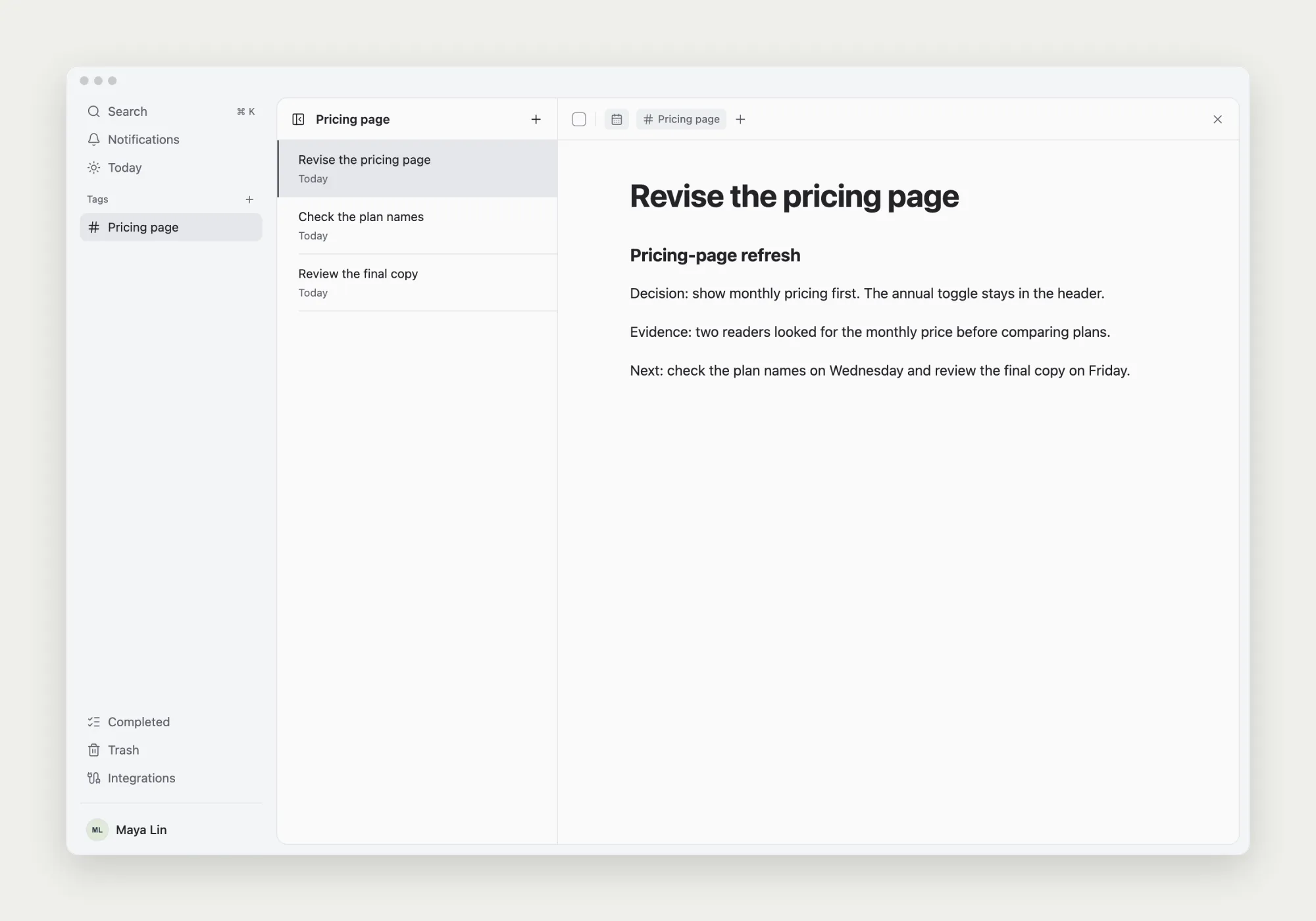
Try finding the decision a week later
Close the final copy review and look up why monthly pricing came first. Record how you found the rationale and whether you could inspect the context without remembering the exact task title.
Keep the workflow that fits the place you already start from each morning. If working from local Markdown files is a requirement, make that part of the decision before comparing views.
Copyable project comparison
Project and source note:
Two actions and due dates:
Where today's work appears:
Next recurring occurrence:
Where the completed decision is found:
Which setup fits my daily routine:For a wider comparison of where to keep lasting notes, see Notion vs Obsidian for project notes.